I Found 7% of AI-Built Supabase Apps Wide Open. Here's How to Lock Yours.
A 2026 audit of 1,764 vibe-coded apps found that 7% had completely open Supabase databases. Here are the four RLS mistakes AI tools make, with copy-paste fixes.
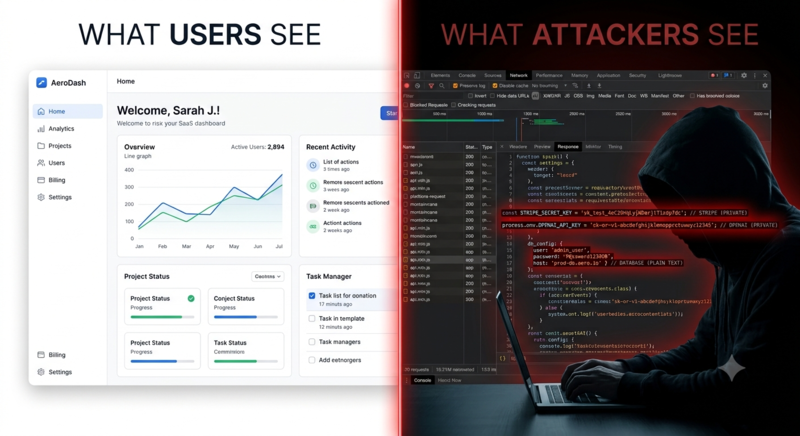
A friend shipped a marketplace app last month. Auth, Stripe, realtime chat — the whole thing built with Bolt in a weekend. He was proud of it. Rightly so.
I opened DevTools and grabbed his Supabase project URL from a network request. Then I pasted it into a simple curl command with his anon key. No auth. No token. Just a GET request.
Every user profile came back. Emails, signup dates, internal IDs. The whole table. Wide open.
He stared at his screen for about ten seconds. Then he whispered, "Row Level Security?"
Yeah. Row Level Security.
Why This Keeps Happening
The 2026 vibe-coded app audit didn't surprise me. Out of 1,764 apps scanned, 7% had no Row Level Security enabled at all. Not misconfigured — just straight-up absent. Another 15% of Bolt-generated apps shipped hardcoded Supabase service role keys in client-side JavaScript.
This isn't a Supabase problem. Supabase gives you one of the best security models in the business. The problem is that AI coding tools optimize for working code, and a Supabase project works beautifully without RLS. Queries succeed. Data flows. Your dashboard renders. Everything looks perfect — right up until someone discovers your project URL and runs SELECT * FROM users.
The emotional gut-punch is real. You didn't make a mistake. You used a tool. The tool generated code that works. And "works" is not the same as "secure."
What Row Level Security Actually Does
RLS is not middleware. It's not an application-layer check. It's Postgres itself, at the database level, filtering every query before it returns a single row.
When RLS is enabled on a table, the database runs a policy check against every row before including it in a result. If the policy says no, that row might as well not exist.
Here's what a correct policy looks like:
CREATE POLICY "Users can read their own data"
ON public.profiles
FOR SELECT
USING (auth.uid() = user_id);
Figure 2: A correct RLS policy — only returns rows where user_id matches the authenticated user's ID.
This means: for every SELECT against profiles, only return rows where user_id matches the authenticated user's ID. If nobody's logged in, auth.uid() returns null, and null equals nothing. Zero rows returned.
The database enforces this. Not your app. Not your middleware. Not a client-side if statement. The database.
The Four Mistakes AI Tools Keep Making
I've reviewed hundreds of AI-generated Supabase schemas. The same four patterns appear over and over.
Mistake 1: RLS Never Enabled
-- What AI tools generate:
CREATE TABLE public.user_profiles (
  id uuid PRIMARY KEY,
  email text,
  credit_card_last_four text,
  api_keys text
);

-- What's missing:
ALTER TABLE public.user_profiles ENABLE ROW LEVEL SECURITY;
Figure 3: AI-generated table without RLS enabled — every row is visible to anyone with the anon key.
Without that one line, every row is visible to anyone holding your anon key. And your anon key is public by design — it sits in your client code, visible in every browser DevTools panel.
Fix: Add ALTER TABLE public.<name> ENABLE ROW LEVEL SECURITY for every table. Then add at least one policy. A table with RLS enabled but zero policies defaults to denying everything — which is safe, but your app won't work until you add the right policies.
Mistake 2: The USING (true) Trap
-- Dangerously permissive — AI-generated anti-pattern
CREATE POLICY "Allow all access"
ON public.user_profiles
FOR ALL
USING (true);
Figure 4: The USING (true) anti-pattern — functionally identical to disabled RLS but looks like a configured policy.
USING (true) means "this check passes for every row." It's functionally identical to having RLS disabled, but it looks like you did something. AI tools generate this because it makes the app work immediately and the policy name sounds plausible.
Fix: Never use USING (true) on tables containing user data. Every policy should reference auth.uid() or check against the authenticated user's role.
Mistake 3: Service Role Key in the Browser
// ❌ Found in live Bolt.new apps — service_role key in client code
const supabase = createClient(
  'https://abc123.supabase.co',
  'eyJhbGciOi...service_role...'  // ☠️ BYPASSES ALL RLS
);
Figure 5: Service role key exposed in client-side JavaScript — bypasses every RLS policy and grants full database access.
The service role key bypasses every RLS policy. Every. Single. One. Putting it in client-side JavaScript means anyone who views your page source can read, write, and delete your entire database.
Fix: Use sb_publishable_* keys on the client. Those respect RLS. Reserve sb_secret_* keys for server-side code only — API routes, edge functions, background jobs.
Mistake 4: Not Handling Unauthenticated Users
-- ❌ Returns zero rows for unauthenticated visitors
CREATE POLICY "Users can read own data"
ON public.documents
FOR SELECT
USING (auth.uid() = owner_id);
Figure 6: A policy that returns zero rows for unauthenticated users — auth.uid() is null, and null never equals anything.
When nobody's logged in, auth.uid() is null. And null = owner_id is never true — so this policy returns nothing. If you have public documents, nobody can read them.
Fix: Create separate policies for public and authenticated access:
-- Public documents: anyone can read
CREATE POLICY "Anyone can read public docs"
ON public.documents
FOR SELECT
USING (is_public = true);

-- Private documents: owner only
CREATE POLICY "Owners can read their docs"
ON public.documents
FOR SELECT
USING (auth.uid() = owner_id);
Figure 7: Separate policies for public and authenticated access — Postgres combines them with OR logic.
Postgres evaluates all applicable policies and combines them with OR logic. If any policy passes, the row is included.
The Five-Question Checklist
After generating a Supabase app, go through this:
| # | Question | If No |
|---|---|---|
| 1 | Does every table have ENABLE ROW LEVEL SECURITY? | Your data is public |
| 2 | Does every table have at least one policy? | Your app is broken (all access denied) |
| 3 | Does any policy use USING (true) on a sensitive table? | RLS is cosmetic — data is public |
| 4 | Is your service role key only in server-side code? | Anyone can nuke your database |
| 5 | Does every policy check auth.uid() or an explicit public flag? | Edge cases will leak or break |
Figure 1: The five-question RLS checklist — run through this after every Supabase generation session.
You can audit this manually in the Supabase dashboard under Authentication → Policies. Or you can run it through VibeShield and get answers in 30 seconds.
Summary
- 7% of AI-built Supabase apps in a 2026 audit had no Row Level Security enabled at all — every table wide open to anyone with the anon key. Another 15% of Bolt-generated apps shipped hardcoded service role keys in client-side JavaScript.
- The four critical RLS mistakes AI tools make: (1) never enabling RLS, (2) using
USING (true)which is functionally identical to disabled RLS, (3) putting theservice_rolekey in browser code where it bypasses all security, and (4) not handling unauthenticated users, which either leaks or breaks public access. - Use the five-question checklist after every Supabase generation session: RLS enabled on every table? At least one policy per table? No
USING (true)on sensitive tables? Service role key server-side only? Every policy checksauth.uid()or a public flag? - Postgres enforces RLS at the database level — if a policy says no, that row might as well not exist. This is not middleware, not an app-layer check, and not something client-side
ifstatements can replace.
Found this useful? Scan your Supabase app at vibeshield.org — free, no account needed. The scanner checks RLS configuration, exposed keys, and cookie flags in one pass.
Read next: I Shipped an AI App in 4 Hours. Then I Found My Stripe Key in the Browser for leaked API keys. Or Your App Scored 48/100. Here's What That Actually Means to understand your security score.