I Shipped an AI App in 4 Hours. Then I Found My Stripe Key in the Browser.
A founder shipped their entire SaaS with Cursor. Two minutes later, I found their Stripe secret key sitting in a <script> tag. Here's what happened, and how to make sure it doesn't happen to you.
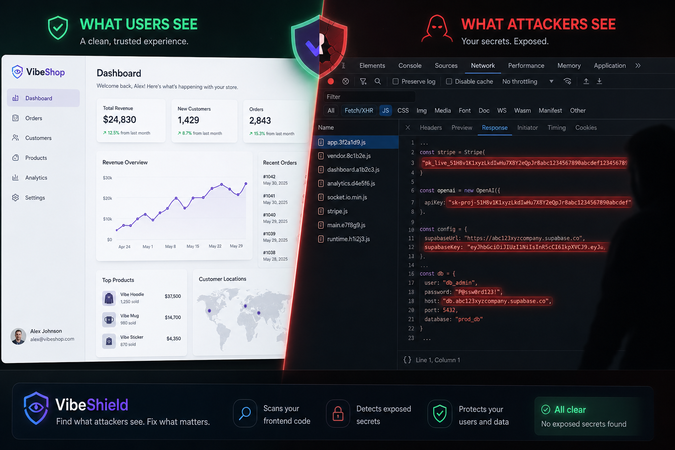
Let me tell you about a Friday night I won't forget.
A founder — let's call him Marcus — posted a thread on X that went viral. He'd built an entire SaaS dashboard in four hours using Cursor. Auth, payments, database, the works. Hundreds of thousands of impressions. People were celebrating. "AI is making everyone a developer," they said. "This is the future."
I was curious. I opened his production URL and pressed Cmd+Option+I.
Two minutes later, I was staring at his Stripe live secret key. Sitting in a <script> tag. On the client side. Visible to anyone who knows how to right-click and select "View Page Source."
I closed the tab. I didn't touch anything. I DMed him immediately. He rotated the key within the hour.
But here's what kept me up that night: this isn't Marcus's fault. It's not even Cursor's fault. The problem is structural. AI coding tools have been trained on millions of code examples from GitHub, tutorials, and Stack Overflow. Most of those examples are insecure. The models learn patterns — and the most common pattern for connecting to an API is to hardcode the key.
A study published on arXiv (2502.01853) found that LLM-generated code consistently produces recurring security weaknesses across six programming languages. AppSec Santa tested 522 code samples across six LLMs and found a 25.7% vulnerability rate. The Cloud Security Alliance reported that AI-assisted developers introduce security findings at ten times the rate of their peers.
Marcus didn't make a mistake. He used a tool exactly as it was designed to be used. The tool just happened to be trained on bad examples.
The Three Leaks Every AI App Ships
After scanning hundreds of vibe-coded apps with VibeShield, I can tell you there are exactly three patterns that show up over and over. Here they are, with the actual code the AI generates.
1. Stripe sk_live in Client Code
This is the big one. When you ask an AI tool to "add Stripe payments," it often generates something like this:
// components/PaymentForm.tsx — generated by Bolt or Cursor
import { loadStripe } from '@stripe/stripe-js';

const stripePromise = loadStripe('sk_live_p7dc...');
Figure 1: AI-generated Stripe client code — sk_live_ key exposed in a browser component where anyone can read it.
That key can create charges. It can refund customers. It can access your entire Stripe account — your transaction history, your customer list, your revenue data.
The fix is straightforward. Stripe gives you two keys. The pk_live_ key is designed to be public — use it on the client. The sk_live_ key belongs on a server, behind an API route:
// ✅ Server-side only: app/api/create-checkout/route.ts
import Stripe from 'stripe';

const stripe = new Stripe(process.env.STRIPE_SECRET_KEY!);

export async function POST(request: Request) {
  const session = await stripe.checkout.sessions.create({
    line_items: [{ price: 'price_abc123', quantity: 1 }],
    mode: 'payment',
    success_url: `${request.headers.get('origin')}/success`,
  });
  return Response.json({ url: session.url });
}
Figure 2: The correct Stripe pattern — server-side API route that keeps the secret key out of the browser.
The client calls /api/create-checkout. The key stays on the server.
2. OpenAI Keys Exposed via Environment Variables
AI tools love generating .env files. But they don't understand that some variables must stay server-side:
# ❌ Gets inlined into every browser that visits your app
NEXT_PUBLIC_OPENAI_API_KEY=sk-proj-abc123...
Figure 3: NEXT_PUBLIC_ prefix inlines the key into every browser bundle — visible to anyone who opens DevTools.
The NEXT_PUBLIC_ prefix tells Next.js to inline this value into the client bundle at build time. Every visitor to your site can open DevTools and read it.
According to Rafter's 2026 analysis, leaked OpenAI keys get exploited within minutes — attackers run automated scanners that find exposed keys and immediately use them for crypto mining inference. A single compromised key can generate thousands of dollars in charges.
Remove the prefix and call OpenAI through an API route:
// ✅ app/api/chat/route.ts
import OpenAI from 'openai';

const openai = new OpenAI({ apiKey: process.env.OPENAI_API_KEY });

export async function POST(req: Request) {
  const { messages } = await req.json();
  const completion = await openai.chat.completions.create({
    model: 'gpt-4o', messages,
  });
  return Response.json(completion);
}
Figure 4: Server-side OpenAI API route — the key stays on the server, the client calls the route instead.
3. Supabase Service Role Key in the Browser
Supabase gives you an anon key (safe for client use, when RLS is configured) and a service_role key (bypasses all security — server only). AI tools frequently mix them up:
// ❌ Found in live Bolt-generated apps — service_role in the browser
const supabase = createClient(
  'https://abc123.supabase.co',
  'sb_secret_abc123...'  // This bypasses every security rule
);
Figure 5: Supabase service_role key exposed in browser code — bypasses every RLS policy and grants full database access.
A single exposed service role key means anyone can read, write, and delete everything in your database. No password needed. No login required.
What to Do Right Now
If you shipped an AI-generated app, do this:
-
Open your deployed app. Press
Cmd+Option+I(or F12). Go to the Sources tab. Search forsk_live,sk-proj,sb_secret,AKIA, orghp_. If you find any of these in client-side bundles, rotate them immediately. -
Scan with VibeShield. It's free, takes 30 seconds, and catches these patterns automatically. We built it specifically because we kept finding these exact leaks on production apps.
-
Move all secrets to environment variables. And never prefix them with
NEXT_PUBLIC_orVITE_orREACT_APP_. Those prefixes mean "send this to the browser." -
Set up server-side API routes. A five-line route handler is all you need. The key never leaves your server.
-
Rotate exposed keys. If a key was ever in client code — even for five minutes — revoke it and generate a new one. No exceptions.
The cost of not doing this? A founder I spoke to last month got a $14,000 OpenAI bill from a key that was scraped within hours of deployment. Another had their entire Stripe transaction history exported by someone who found their key in a JavaScript bundle. These aren't hypotheticals.
| Leak Pattern | How it happens | Detection difficulty | Fix complexity | Time to exploitation |
|---|---|---|---|---|
Stripe sk_live in JS bundle | AI generates loadStripe('sk_live_...') in a component | Easy — grep for sk_live | Medium — refactor to API route | Hours |
NEXT_PUBLIC_ OpenAI key | AI adds prefix, Vite/Next.js inlines at build time | Easy — check env vars | Low — remove prefix, add route | Minutes |
Supabase service_role key | AI confuses anon vs service_role keys | Easy — grep for sb_secret | Low — switch to anon key | Minutes |
Figure 6: The three most common AI-shipped API key leaks — how they happen, detection difficulty, and fix complexity.
Summary
- Three API key leak patterns dominate AI-generated apps: Stripe
sk_livekeys in client bundles,NEXT_PUBLIC_-prefixed OpenAI keys inlined into every browser, and Supabaseservice_rolekeys that bypass all database security. - Leaked OpenAI keys get exploited within minutes — attackers run automated scanners and immediately use found keys for crypto mining inference, generating thousands of dollars in charges before you notice.
- The fix pattern is consistent across all three: move the key to a server-side environment variable (never
NEXT_PUBLIC_), create a short API route that uses the key, and have the client call the route instead. Rotate any key that was ever in client code — no exceptions. - The five-minute audit: open your deployed app, search Sources for
sk_live,sk-proj,sb_secret,AKIA, orghp_. If you find any in client-side bundles, rotate them immediately.
Found this useful? Scan your app at vibeshield.org — free, no account needed. Catches these exact leak patterns automatically.
Read next: 5 Security Headers Every Vibe-Coded App Needs for the other half of shipping secure AI apps. Also Your App Scored 48/100 to understand what your security score means.